Backlinks: referring domains
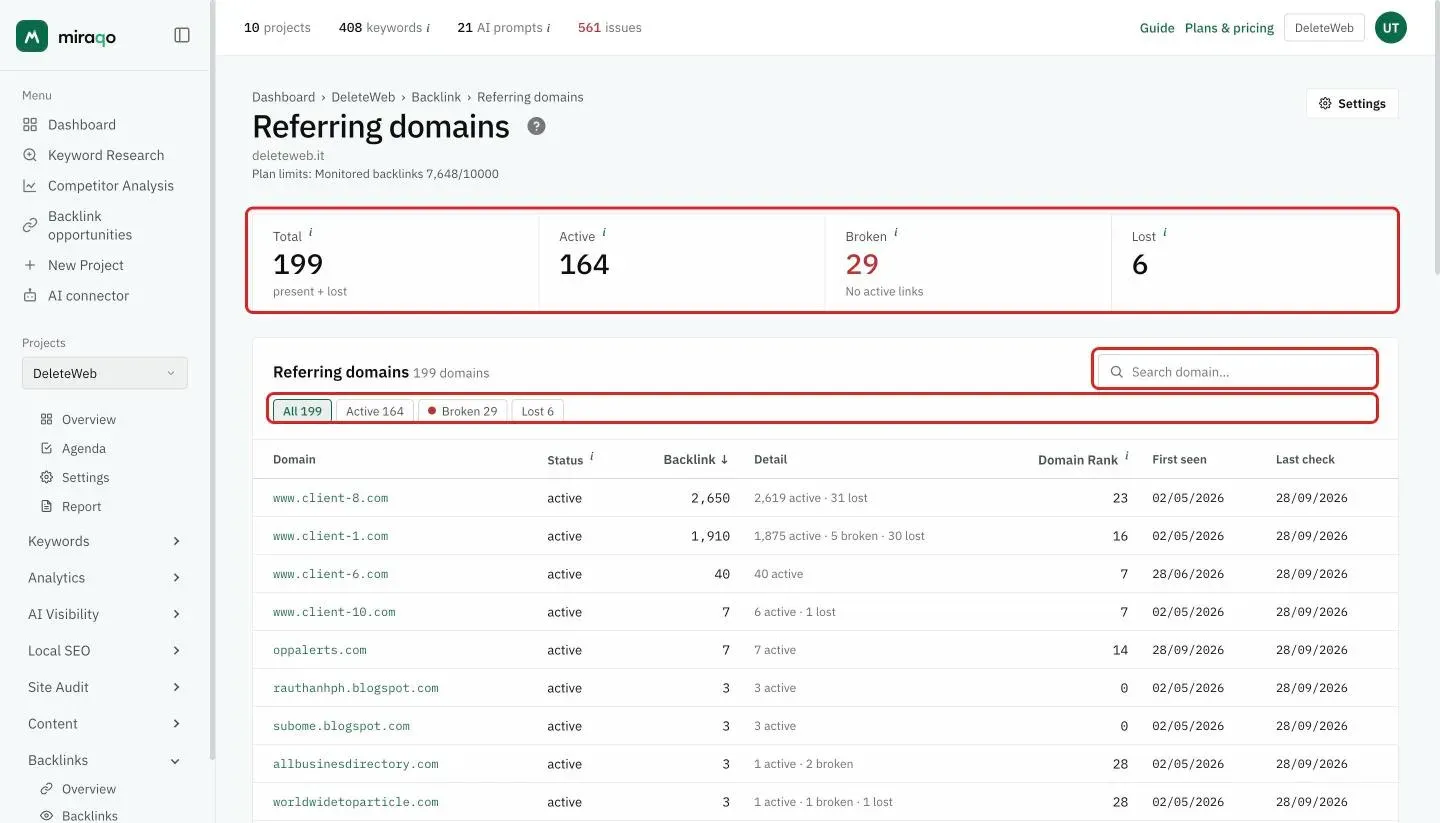
The Domains page — aggregate view by source domain with Total / Active / Broken / Lost counts, backlink counts per domain, Domain Rank 0–100, first detection, status + domain search filters.
The Referring domains page (the Domains item, third in the Backlinks group of the sidebar) shows your backlink profile aggregated by source domain instead of link-by-link. It’s the right view to:
- Understand how many distinct domains link to you (the most important metric in the backlink profile, see note below)
- See who links to you most (sites that have more than one link to you)
- Identify lost domains (all links lost) to recover through outreach
Domains > Links. Having 100 backlinks from 100 different domains is worth much more than 1,000 backlinks from the same domain. The diversity of the referring profile is a primary signal for Google: more unique references beats many links from the same site.
The 4 figures at the top
- Total — present + lost: all the domains that have linked to the site
- Active — domains with at least one currently active link
- Broken — No active links: domains with no active link but at least one broken link (error, noindex or not yet verified)
- Lost — domains with all links lost: ideal candidates for a recovery outreach to the webmaster
Filters and search
In the Referring domains card, the All / Active / Broken / Lost chips (with the count) filter the table; at the top right is the search by domain name.
The table
One row per source domain, the domain with the most backlinks first. Columns:
| Column | What it is |
|---|---|
| Domain | Source domain with a link to the homepage |
| Status | The same words as backlinks: active (at least one active link), broken (no active link but at least one broken) or lost on … (all links lost, with the date) |
| Backlink | Total number of links from this domain |
| Detail | The active · broken · lost breakdown (e.g. “2,619 active · 31 lost”) |
| Domain Rank | Domain authority on a 0–100 scale |
| First seen | When you received the first backlink from this domain |
| Last check | Last confirmed presence in the snapshot |
What to do with it
- Lost domains with many backlinks → there were many links and now they’re gone: a template or policy change on the site broke everything. Worth an email to the webmaster.
- “Active” domains with very high DR (≥50) → valuable relationships: keep them safe, avoid breaking destination pages (missing redirects = broken backlink).
- “Active” domains with very low DR (<10) and many links → possible link farm or spam: compare with the Backlinks (monitoring) list and consider disavow if the spam score is high.
Update frequency
Automatic every 4 weeks (28 days), like all pages in the Backlinks section.
Empty state
“No domains found” — wait for the first snapshot (it starts on its own a few minutes after the project is added).
See also:
- Backlinks overview → — KPIs and trends of the backlink profile
- Backlinks (monitoring) → — list of individual links with disavow
- Anchor Text Ranking → — anchor texts
Last updated: 18 October 2026