Ranking history: positions over time
How to read the Historical trend page — desktop vs mobile average position, the Compare chart with up to 6 keywords and the table of all keywords with mini-chart, change and best position.
The Historical trend page shows how positions have changed over time for the entire project and for individual keywords. It’s different from Keyword Detail, which gives a snapshot of the current state: here you’re looking at the history.
Reach it from the project → Historical trend in the sidebar.
Time range selector
Top right, the buttons select the period shown across the whole page (7 days, 1 month, 3 months, 6 months, 1 year, 2 years): charts, mini-charts and table columns.
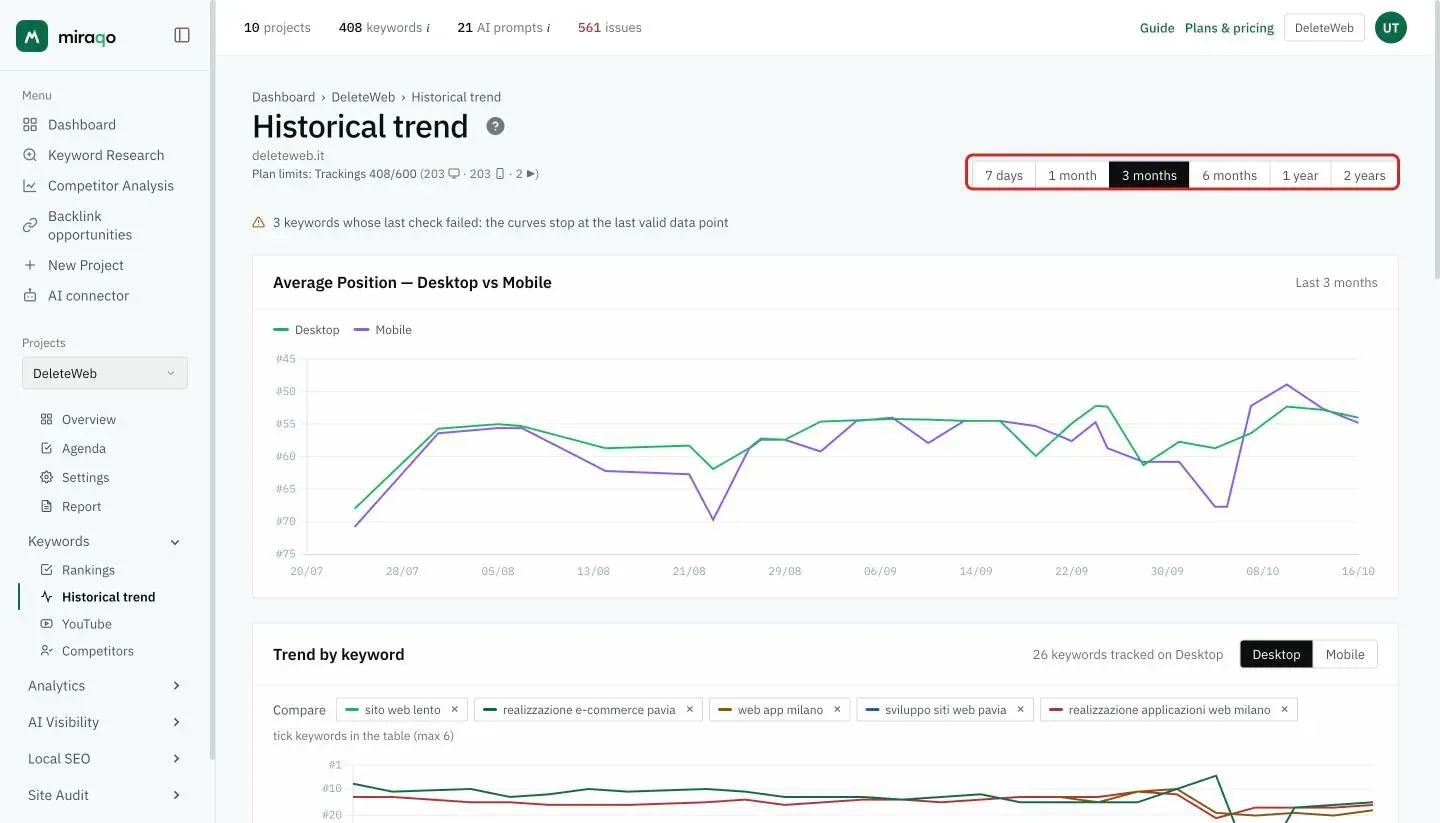
Average Position — Desktop vs Mobile
A two-line chart, Desktop (green) and Mobile (purple), with the average position of all the project’s keywords.
Inverted Y axis: #1 is at the top, so a line that rises indicates an improvement in the project’s average position. Two diverging lines signal ranking differences between devices (common: mobile is often slightly worse for pages that aren’t optimised for it).
If the latest check of some keyword failed, a notice appears above the chart: the lines stop at the last valid data point instead of dropping to zero.
Trend by keyword
The second card shows all the project’s keywords, for the device chosen with the Desktop / Mobile selector at the top right (next to it you see how many keywords are tracked on that device).
The Compare chart
At the top are the keywords being compared, each with its own colour, and below the chart with one line per keyword. Tick a keyword in the table to add it, remove it with the × next to its name: you can compare up to 6 at a time, so the lines stay readable. When the page opens, the comparison starts from the 5 keywords with the strongest changes in the period.
Same inverted axis logic: rising line = improvement. When a keyword drops out of the Top 100 the line falls into the out of 100 band at the bottom.
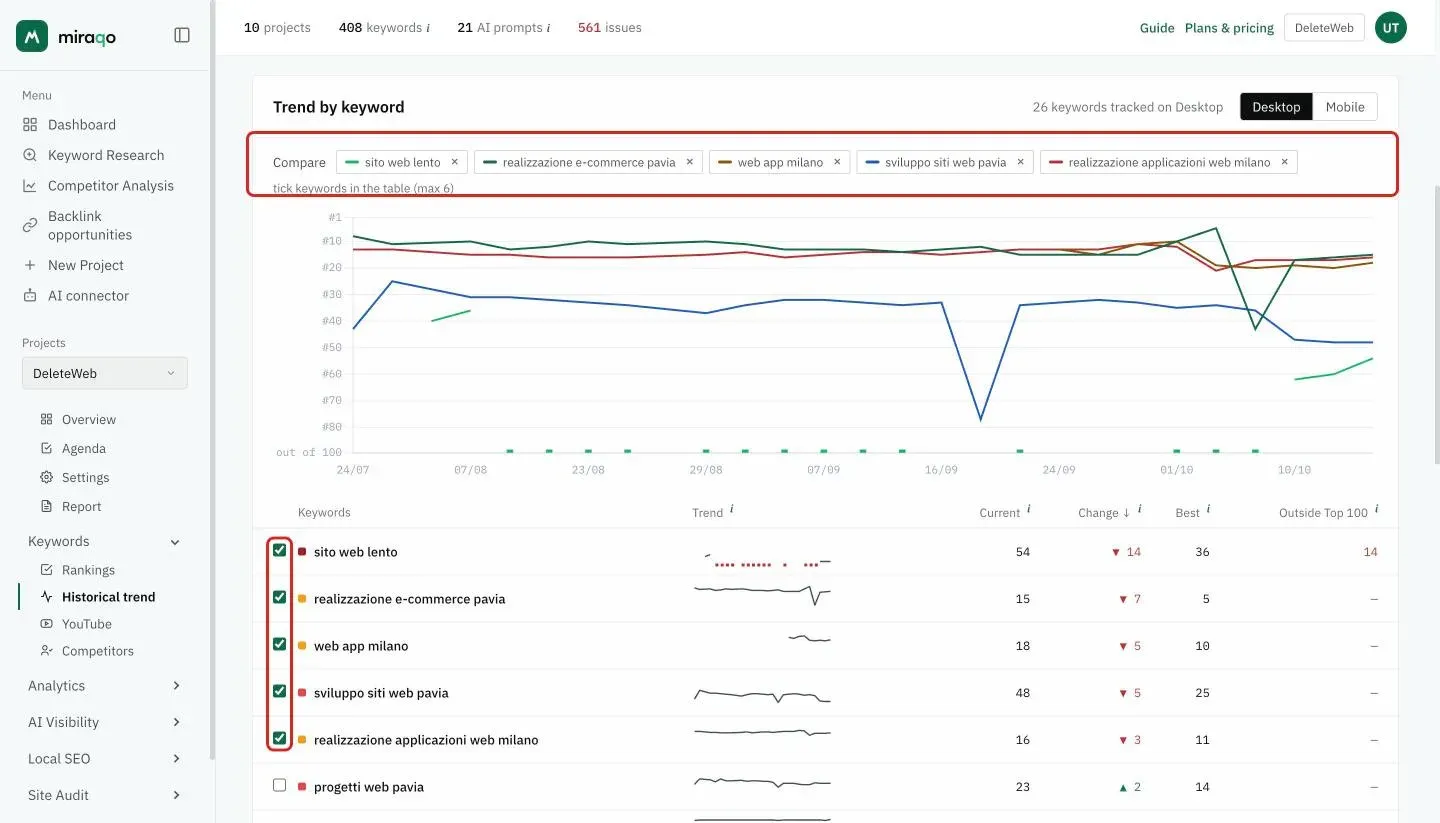
The table
One row per keyword, with a coloured square for the band of the current position (the legend is at the bottom of the card):
| Column | What it contains |
|---|---|
| Trend | Mini-chart with the position at each check in the period. Same scale for all keywords (up to position 50): higher = better position. The red dots at the bottom are the checks outside the Top 100 |
| Current | Position at the latest check, or “out of 100” |
| Change | Difference between the first and the last position in the period: ▲ gained, ▼ lost |
| Best | The highest position reached in the period |
| Outside Top 100 | In how many checks of the period the keyword was not in the first 100 results |
Click a column header to sort. Sorting by Change puts the strongest changes first, up or down: it’s the fastest way to find what moved. In averages a keyword outside the Top 100 counts as position 100, as on the Rankings page.
When a chart is empty
- “No historical data available” — the project was just created or the initial detections haven’t arrived yet. Wait for the next plan SERP update.
- Only desktop populated (or vice versa) — can happen if you recently changed the project configuration or if the keyword pool is too small for the opposite device.
Operational tips
- Use different ranges depending on the question. 7d/30d to explain the variation caused by the latest optimisation; 90d/12 months for the annual renewal pitch to the client.
- For the detail of a keyword (ranking URL at each check, SERP Features) open its Single keyword detail from the Rankings page.
- Sudden jumps in average position — usually mean: many new keywords were added (which start “not ranked” and lower the average), or keywords in decline were removed (which artificially raises the average).
- Mobile consistently below desktop — often a Core Web Vitals or rendering issue: worth doing a mobile-first audit.
See also:
- Positions and keyword detail (current state, filters, management) →
- Launch the SEO Audit → to investigate a sudden drop
Last updated: 18 October 2026