Backlink monitoring, link by link
The Backlinks page — paginated list of individual links with status (active/lost/broken), spam score, DR, Page rank and Rank on a 0–100 scale, filters by status + toxicity + domain search, disavow.txt export for Google Search Console.
The Backlink list page (Backlinks item in the group sidebar) is the complete, paginated and filterable list of every individual backlink detected to the site. What is it for? For seeing which links are active, lost or broken, spotting the toxic links worth disavowing — with the first and last detection dates of each one — and exporting a disavow.txt file ready for Google Search Console.
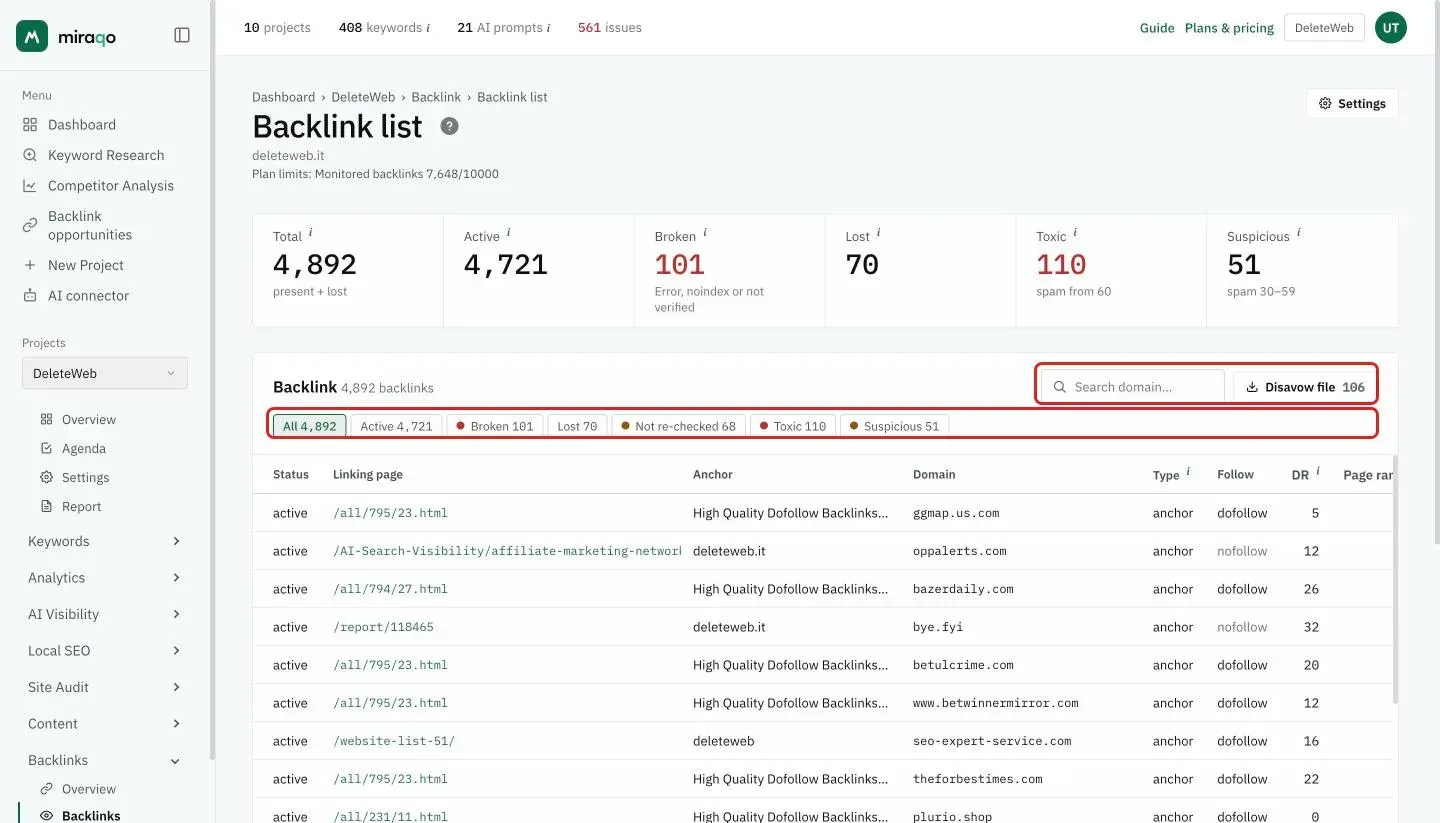
The 6 figures at the top
- Total — present + lost: every backlink in the archive. It is higher than Present backlinks on the Overview, which excludes lost links
- Active — links present and re-checked at the latest detection
- Broken — the linking page responds with an error, is noindex or hasn’t been verified yet; they count among the Present backlinks on the Overview
- Lost — links that no longer exist
- Toxic — active links with a spam score of 60 or more: candidates for the disavow file
- Suspicious — active links with a spam score from 30 to 59: worth checking
Toxic and Suspicious count and filter only active links: the same base as the disavow file.
Filters and search
In the Backlink card, below the title, the All / Active / Broken / Lost / Not re-checked / Toxic / Suspicious chips, each with its count, filter the table. Not re-checked are links still alive that the latest check didn’t re-download (usually because they’re over the project limit). Top right there’s the source domain search and, if there are toxic domains, the Disavow file button with the number of domains.
Filters combine with sort: clicking a sortable column header, the active filter is maintained.
The table
One row per backlink. Columns with an i show an explanation on hover. The table is wide: scroll horizontally to see the columns on the right.
| Column | What it is |
|---|---|
| Status | active / lost / broken |
| Linking page | Path of the page hosting the link (clickable, opens the page) |
| Anchor | Clickable link text (truncated) |
| Domain | Source domain |
| Type | Link type (text, image, redirect, canonical, etc.) |
| Follow | dofollow / nofollow pill |
| DR (Domain Rank) | Source domain authority 0–100 |
| Page Rank | Authority of the individual source page 0–100 |
| Spam | Spam score 0–100: red from 60 up (toxic) |
| Rank | Specific authority of the individual backlink (combines domain + page) |
| Seen | First and last time the link was seen (e.g. «02/08/26 → 28/09/26») |
| Last check | When monitoring last re-downloaded and updated the link. If the link wasn’t re-checked in the latest run, the date carries a ⚠ sign |
Exporting the Disavow file
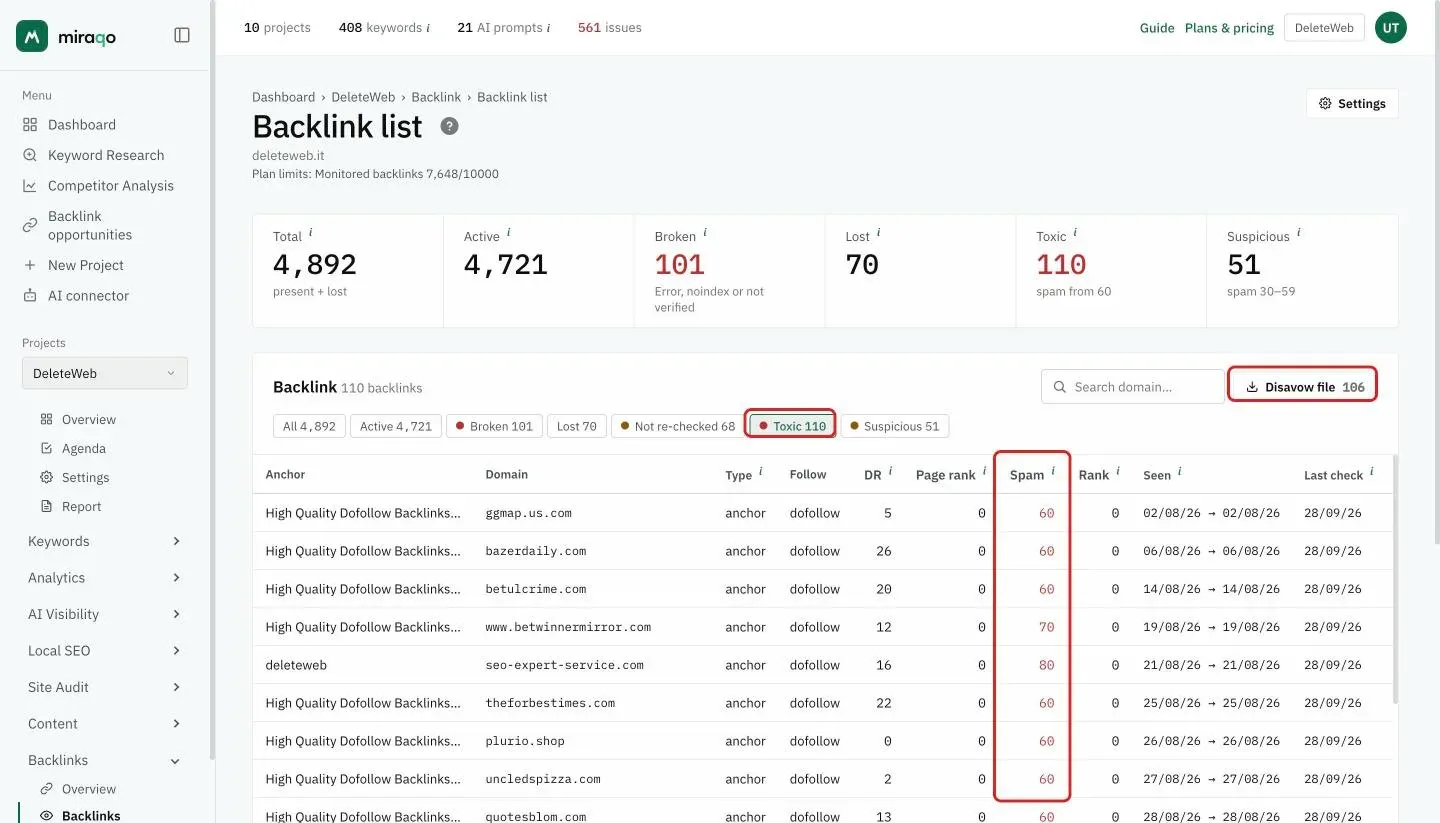
Top right in the card, if there are toxic domains, there’s the Disavow file button with the number of domains. Clicking it downloads a disavow-<domain>-<date>.txt file in the format required by Google Search Console:
# Miraqo disavow export — project: Example Ltd
# Generated: 2026-05-24
# Spam score threshold: >= 60
# Domains: 17
#
# Import this file at https://search.google.com/search-console/disavow-links

domain:spamsite1.ru
domain:linkfarm-abc.cn
domain:...
Only active domains with a spam score above the threshold are included in the file (lost links don’t affect the current profile, they’re skipped). You can force a different threshold by appending ?threshold=N to the export URL (0–100).
Upload it manually on Google Disavow Tool.
Caution. Disavow is a double-edged sword: if you disavow good links, you lose traffic. Use it only if you have a Google manual action or strong evidence of negative SEO. 90% of sites don’t need it: Google already ignores most spammy links without explicit intervention.
Update frequency
Same as Overview: automatic every 4 weeks. There’s no manual sync button.
If a check finds lost backlinks, whoever has the Drops box enabled in the project notifications gets an email with the vanished links (the top 10 by domain authority) and the count of those still active. See Your account.
Per-project limit and plan quota
By default each project monitors its 1,000 best backlinks (by Domain Rank). One site has 300, another 4,000: in Project settings → General, below Country and Language, you can change Maximum backlinks to monitor. The plan’s backlink quota is shared across all projects in the organization: if one project takes 4,000, less is left for the others. When a site has more backlinks than its limit, the page shows a notice: if it is the project limit you read “N active backlinks over the project cap” with the link Raise the cap in Settings; if it is the plan quota you read “N active backlinks beyond the plan limit” with the link Increase the limit. When the plan quota has been used up by the other projects, the project’s monitoring is paused (and the notice tells you where to free up room). Lowering a project’s limit frees quota immediately.
Links over the limit stay visible but frozen: they are no longer re-downloaded, so their status and metrics date back to the Last check column (⚠ badge). The Not re-checked chip isolates them in one click. Raise the project limit and they come back under monitoring at the next run.
Empty state
If no backlinks have been monitored, you see “No backlinks monitored”. Wait for the first snapshot (it starts on its own a few minutes after the project is added).
See also:
- Backlinks overview → — summary and trends
- Referring Domains → — same list aggregated by domain
- Anchor Text → — ranking of anchor texts
Last updated: 18 October 2026