AI-ready Content — pages ready for generative engines
Five deterministic checks on the HTML of every page of the site, computed by the internal crawler during the SEO Audit — text in the HTML, answer up front, question headings, content schema, short paragraphs — with a score per page, the excluded pages with their reason, and the link with AI Visibility: for every prompt that is not cited, the page that should answer, its checks and the AI analysis of what it is missing.
AI-ready Content answers a question that neither the SEO Audit nor AI Visibility covers on its own: are the site’s pages written so that a generative engine (ChatGPT, Perplexity, Google’s AI Overview) can extract and cite them? The SEO Audit looks at technical health, AI Visibility measures whether AIs actually cite you. In between sits the form of the content, checked page by page.
Reach it from the project → sidebar Site Audit → AI-ready Content group (or, from the SEO Audit page, it’s the ?tab=geo view).
Where data comes from. The checks are computed during the SEO Audit crawl by Miraqo’s internal crawler, on the HTML already downloaded: no extra call, no cost. If you see “These checks start with the new audits”, the latest audit predates the feature: press Start audit and the page fills in when the crawl ends.
What it measures, and what it doesn’t
These are deterministic checks of form, with no artificial intelligence: they tell whether the content is extractable, not whether it is exhaustive. A page empty of meaning but well structured scores 100; an excellent page served only through JavaScript scores 0. The page score is the share of checks passed among those applicable to that page: transparent, no hidden weighting. It does not enter the SEO Audit score.
To know whether AIs actually cite the site there is AI Visibility; to know what a page is missing compared with what AIs answer there is the “Why not?” AI analysis, described further down.
The five checks
| Check | What it looks at | Passes if | Why it matters |
|---|---|---|---|
| Text in the HTML | Words in the HTML served by the server, before running JavaScript | The page is not almost empty | AI crawlers mostly do not run JavaScript: a page rendered only client-side does not exist for them. If it fails, the other four checks do not apply. |
| Answer up front | The first paragraph of at least 10 words after the H1 (shorter lines — author and date, reading time, labels — are skipped) | It exists and does not exceed 120 words | AIs pick a direct answer, not an introduction. If only short lines follow the H1 the page shows “No (0)”. |
| Question headings | H2 and H3 ending with a question mark | At least one, on pages with at least two H2/H3 | Question → answer blocks are the most cited ones in generative answers. |
| Content schema | The JSON-LD types declared on the page | At least one among Article, BlogPosting, FAQPage, HowTo, Product, Service, Recipe, Event, LocalBusiness… | Organization, WebSite, WebPage and BreadcrumbList do not count: Yoast and the like put them on every page. Does not apply to category archives. |
| Short paragraphs | The length of every <p> in the content (menu, header and footer excluded) |
No paragraph over 150 words | A wall of text does not break into citable blocks. |
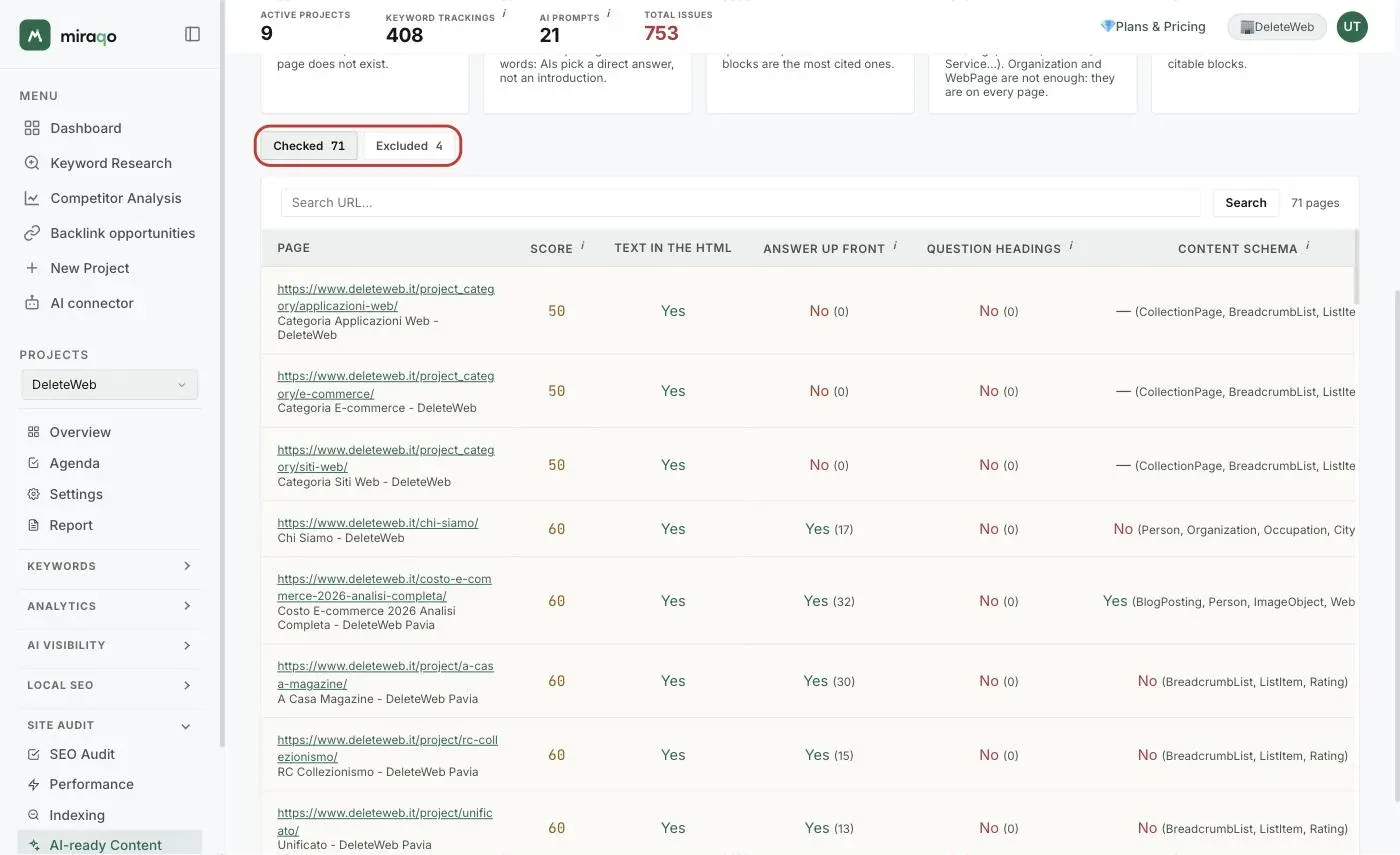
In brackets, in the table, you find the figure behind each outcome: the words of the opening paragraph, how many H2/H3 are questions, the JSON-LD types found, the long paragraphs out of the total.
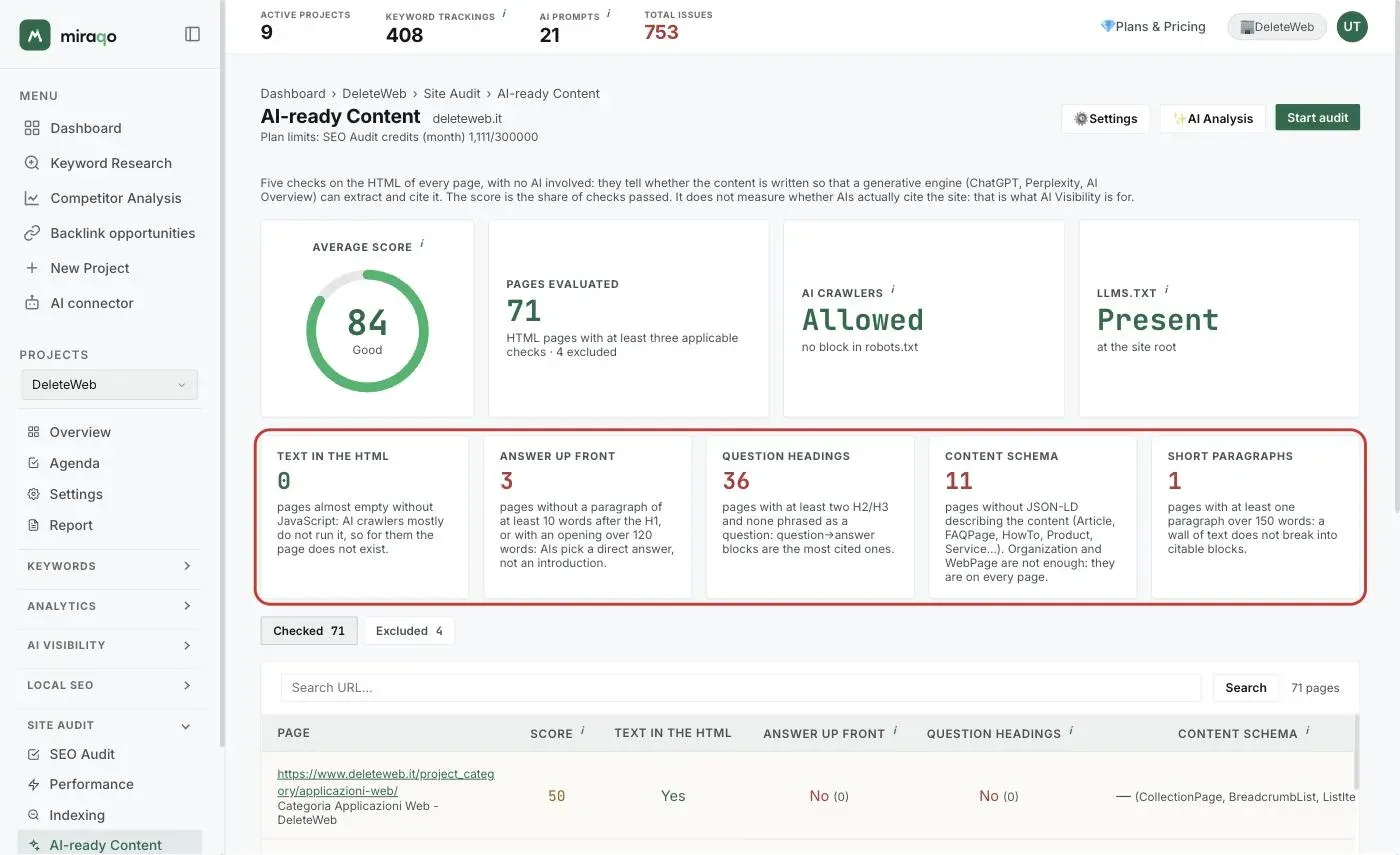
The cards at the top
- Average score (0–100): average of the checked pages’ scores. ≥70 good, 40–69 to improve, <40 critical.
- Pages evaluated: the HTML pages with at least three applicable checks, and how many were excluded.
- AI crawlers: whether
robots.txtbars the AI engines’ crawlers (OAI-SearchBot, PerplexityBot, ClaudeBot, Google-Extended…) from the home page. A blocked crawler reads no page at all, whatever the score: it is the check that comes before all the others. - llms.txt: whether
/llms.txtexists at the site root, the plain-text index some AI engines read to find their way around. Optional, cheap.
Below, one card per check with how many pages fail it: the fastest view to see where the site’s problem lies.
Checked and excluded
Two tabs above the table:
- Checked — the pages that enter the score, sorted from the worst: start here. Each row shows URL and title, the score and the five outcomes (Yes, No, or “—” when the check does not apply to that page). The URL search filters the table; beyond 300 rows the ones with the lowest score are shown.
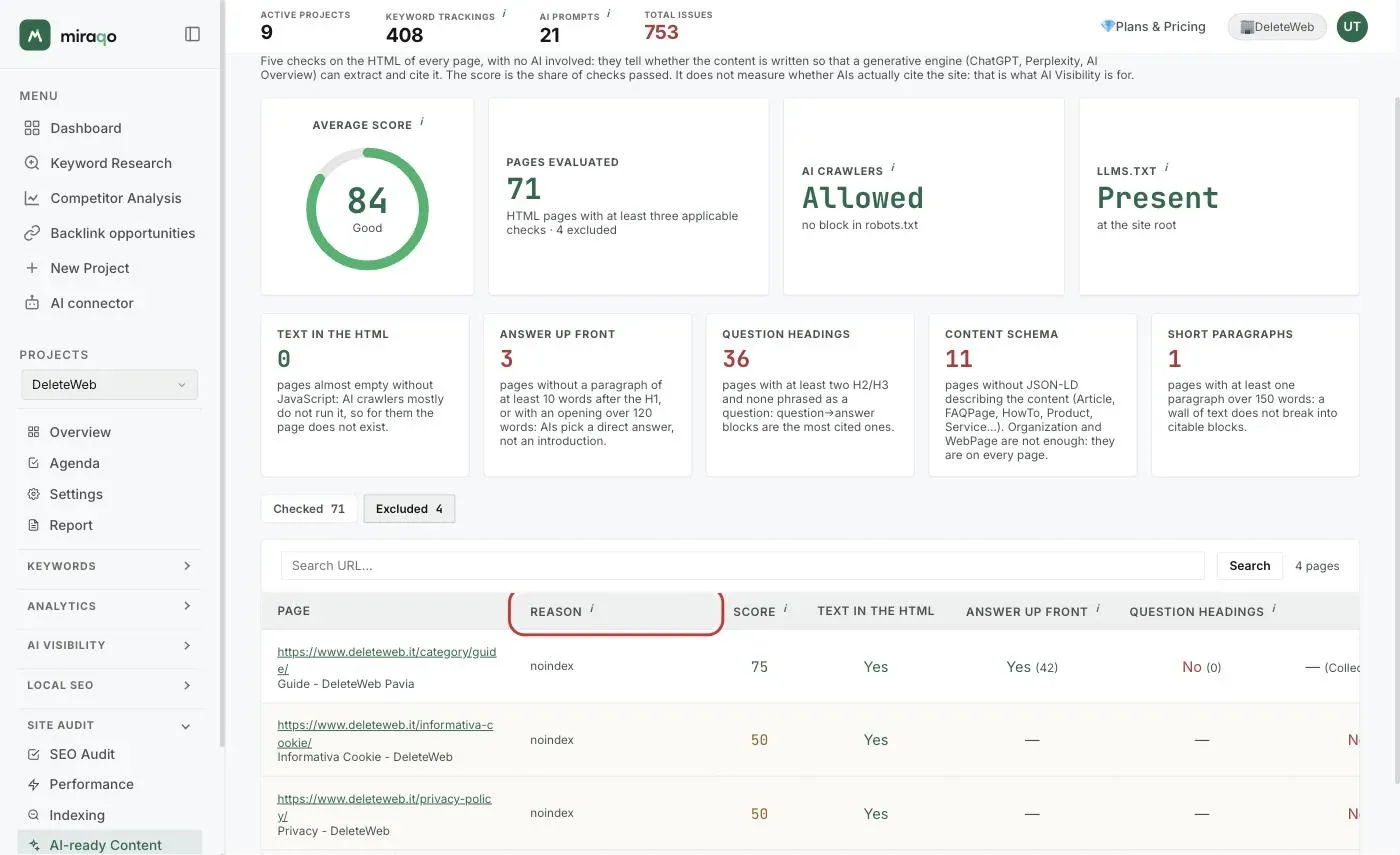
- Excluded — the pages left out of the score, with the Reason column:
noindex(engines do not index it, so they do not cite it: login, password reset, privacy…), outside the project domain (reached through a redirect, for instance a third-party sign-in page), fewer than 3 applicable checks (no paragraphs and no headings: not a content page, like the archives of a status page).
Categories count. Category archives stay among the checked pages: in an e-commerce the category is the page you optimise for generative engines, single products cannot be tended one by one. A category without even one descriptive paragraph shows “Answer up front: No (0)”, and that is a concrete action to take.
“Why not?” in AI Visibility
The link with AI Visibility is the reason this page exists. In the prompts table, next to every prompt that no AI source cites, you find the 🔎 Why not? button. Opened, it shows:
- the page of the site that should answer the prompt: the URL ranking on Google for the linked keyword, otherwise the page whose title, H1, meta description and URL are closest to the prompt;
- its score and the five checks, with the link to open it in AI-ready Content;
- a one-line verdict: start from the checks in red if the form has defects, or the form is fine: the page does not cover what the AIs answer if everything is green.
If no page on the site resembles the prompt it says so plainly: there is no content for this intent, and AIs cannot cite a page that does not exist.
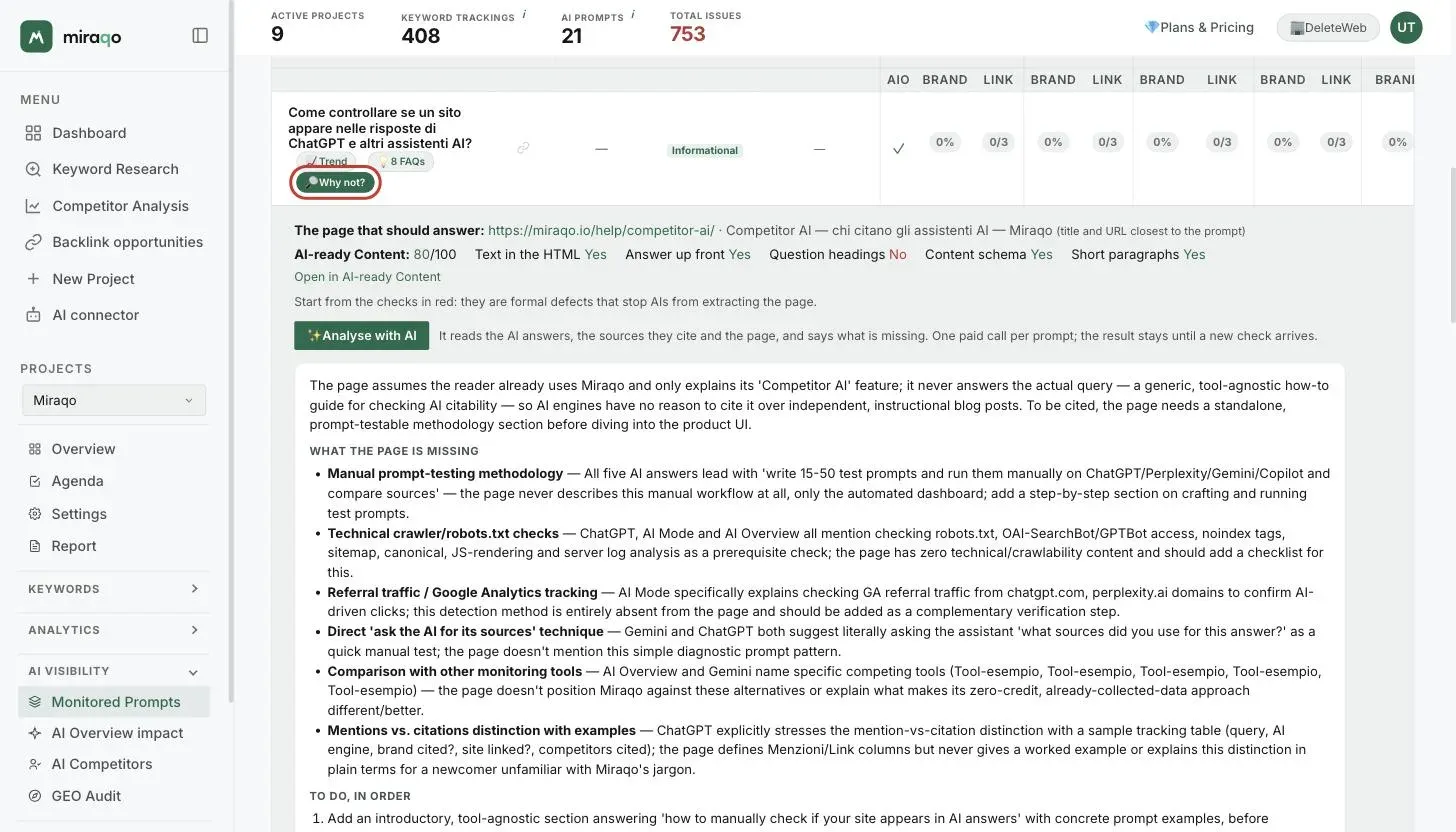
The candidate page is chosen by word overlap between the prompt and title/H1/description/URL: it works well when the page exists and speaks the prompt’s language, it can pick the wrong page when two similar pages share the same words. For that case there is the AI analysis.
✨ Analyse with AI
In the same row, ✨ Analyse with AI runs the real analysis: a language model reads the answers the AIs gave to that prompt, the sources they cited (the competitors) and the candidate page read live, and answers with:
- a summary in two or three sentences: the main reason the site is not cited, told to whoever writes the page;
- what the page is missing: up to five concrete gaps — sub-topics, data, comparisons, questions — with what the AIs or the sources say on that point;
- to do, in order: up to four actions.
Without a candidate page the analysis instead describes what the page to create should contain. At the bottom you find the sources cited by the AIs, worth reading to understand what gets rewarded.
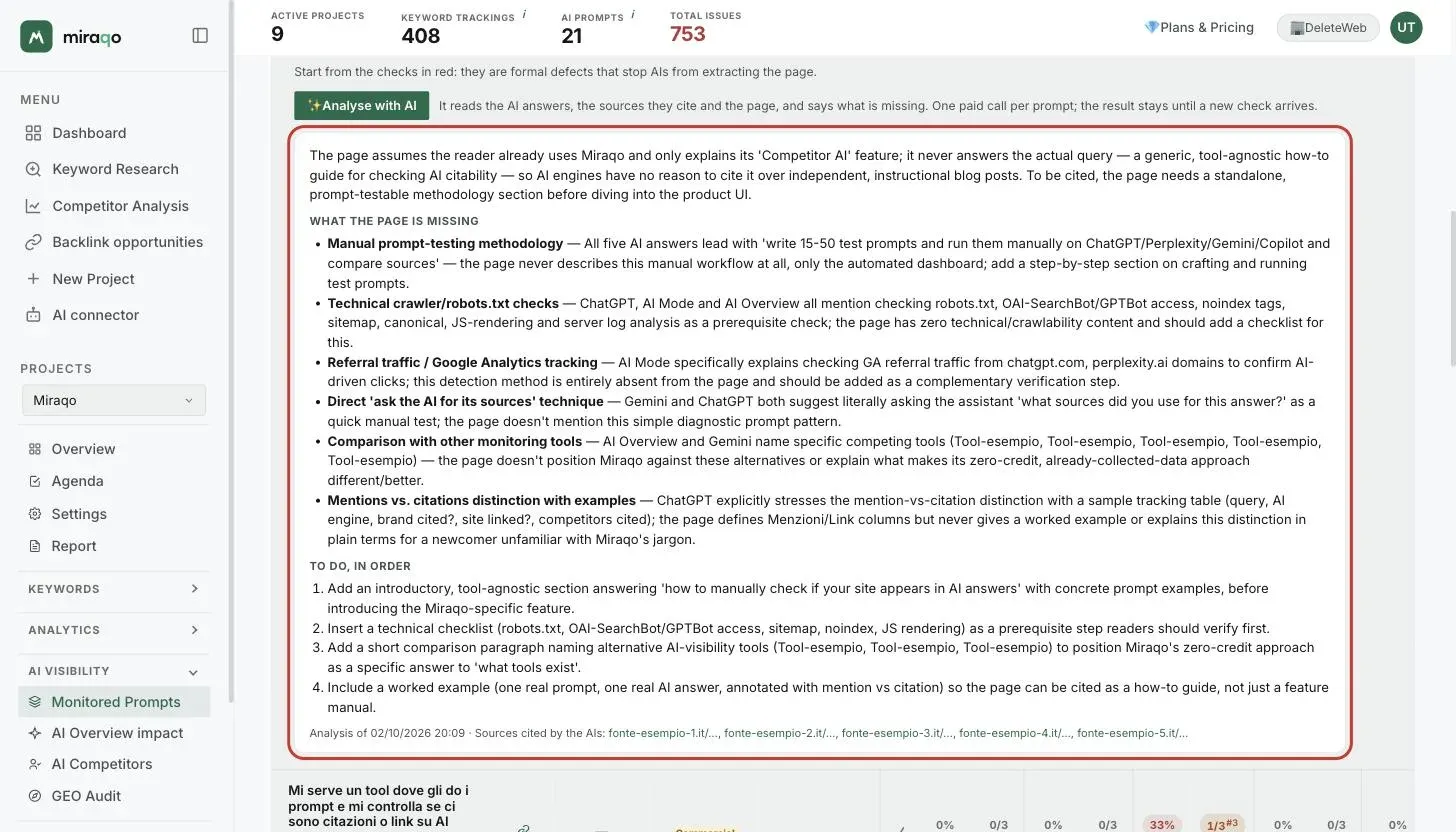
One paid call per prompt, within the monthly budget. Each analysis is an AI call (about three cents of direct cost) and counts against a monthly budget tied to the plan — Solo 20, Starter 40, Pro 100, Agency 200 per month, 5 in the free trial. The result stays saved on the prompt: clicking again costs nothing until a new AI Visibility check arrives, after which it can be regenerated. The action requires the member’s AI analysis permission (see User permissions). The analysis comes out in the interface language of whoever runs it: it is advice for the writer, not text for the site.
Notes and limits
- Analysis of form, not of substance: the five checks do not judge the quality or the completeness of the text. For that there is the AI analysis, which however should be read as an opinion to verify, not as a rule.
- JavaScript sites (SPA): the crawler reads the HTML served by the server and does not run JavaScript, exactly like most AI crawlers. A Vue/React/Angular site in client-side mode shows “Text in the HTML: No” on every page; the same framework in SSR or SSG works normally.
- The thresholds (10 and 120 words for the opening, 150 for paragraphs, two H2/H3 for question headings) are tuned on real sites and the same for everyone: they are not configurable.
- The checks update at every new audit with the internal crawler; there is no independent refresh. The Checked/Excluded tabs and the “Why not?” button use the data of the latest completed audit.
- Access to the page follows the member’s SEO Audit permission; the “Why not?” button appears in AI Visibility to whoever sees the prompts, the AI analysis to whoever has the AI analysis permission.
See also:
- Start the first SEO audit → — the checks are born here
- AI Visibility: monitored prompts → — where “Why not?” lives
- GEO Audit → — how AIs describe the brand, the other half of the picture
- User permissions → — who sees the page and who can run the AI analysis
Last updated: 2 October 2026