Auditing a multilingual site
How the SEO Audit and Topical Cluster handle a site in several languages. The Topical Cluster recognises each page's language and computes clusters, pillar pages and metrics language by language, with a switcher to move between them. Depending on how languages are structured — separate domains, /en /it folders or subdomains — the project setup changes.
The SEO Audit scans all the site’s languages together: titles, meta descriptions, broken links and Core Web Vitals apply the same way in every language. The Topical Cluster, on the other hand, recognises each page’s language — from the URL prefix (/en/, /de/…) or from the page’s lang attribute — and works language by language: each language has its own internal link network, so clusters, pillar page and metrics are computed separately. A Language switcher appears above the map to move between languages or view All languages.
What happens under the hood:
- The main language is the home page’s language and is the view shown by default.
- Translations inherit the topic of the page in the main language, matched via
hreflangor via the same path without prefix. On a well-translated site the clusters are the same in every language, with names like “Guides · EN”, “Guides · DE”. - Links between a page and its translation (the site’s language switcher) don’t count as cross-cluster links, reciprocal or not.
- The switcher applies to every tab in the section, to the CSV exports and to the PDF: you export the language you’re looking at.
- The AI refinement ✨ reasons about the main-language pages and propagates the topics to the translations.
Audits run before 9 October 2026 don’t carry the language on their pages, so the switcher doesn’t appear. Run a new audit and, if you use it, re-run the AI refinement.
What to set up in the project depends on how the site separates its languages. Three cases.
1. Different domains per language → one project per language
If each language lives on a separate domain (ccTLD or distinct domains):
example.co.uk   ← English
example.de      ← German
example.fr      ← French
This is the clean case. The crawler stays on the project’s domain and doesn’t cross to other domains: each language is already its own site. Simply create one project per domain and run one audit for each. No special measures needed.
2. Language in a folder (/en, /it) → one audit, the switcher does the rest
If the languages are on the same domain, distinguished only by path:
example.com/en/...   ← English
example.com/it/...   ← Italian
example.com/fr/...   ← French
A single audit scans all of them together and the Topical Cluster separates them on its own: nothing to configure. Pick the language from the switcher and, for the overall picture, All languages.
If you only care about one language — or want to save credits — you can limit the crawl from the Audit settings → Crawl → Include only URLs starting with:
https://example.com/en/Both the SEO Audit and the Topical Cluster then stay on that language.
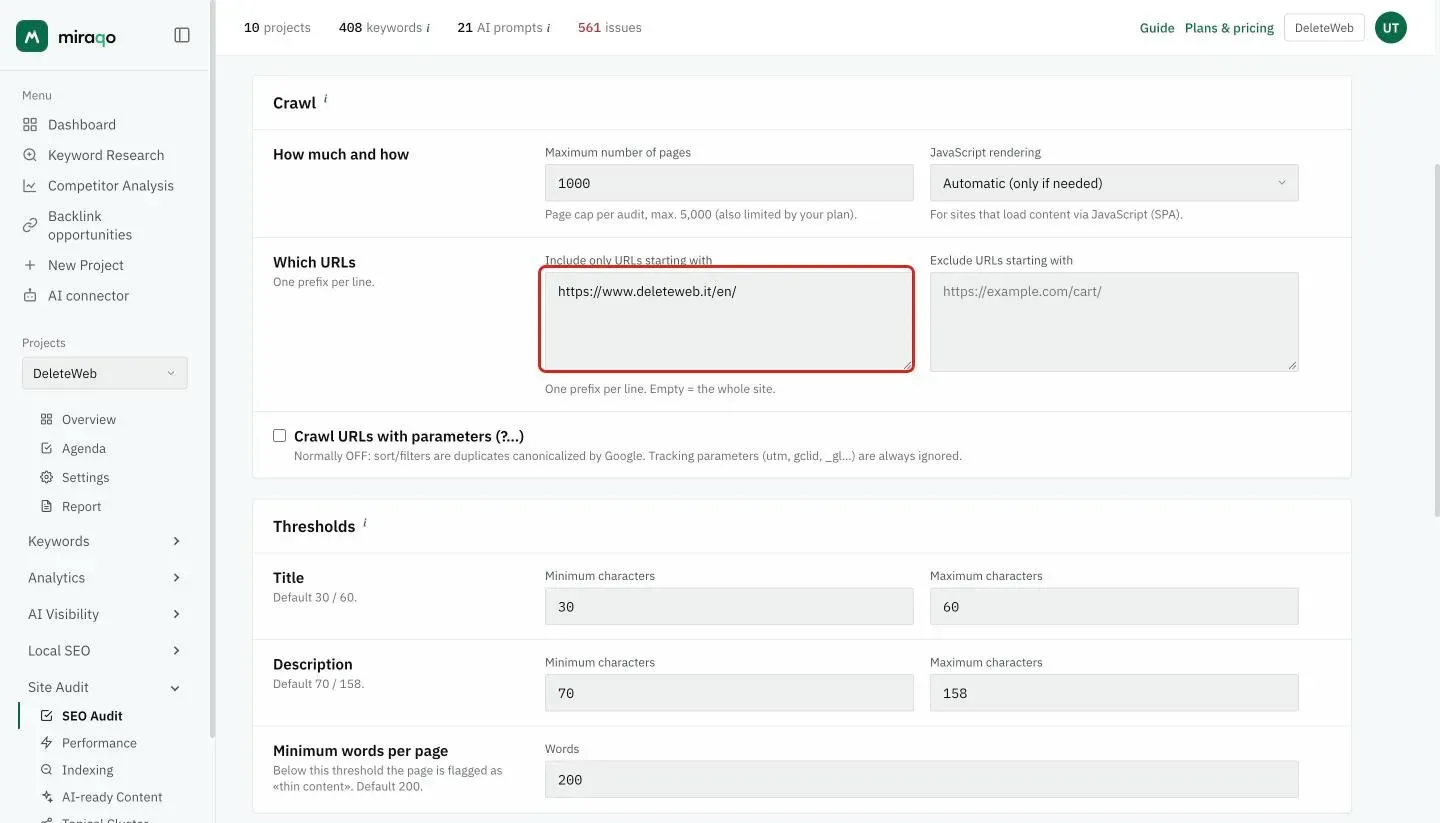
Alternatively you can use Exclude URLs starting with to remove the languages you’re not interested in (e.g. exclude
/it/and/fr/to keep only English).
3. Subdomains per language → one project per subdomain
If the languages are on subdomains:
en.example.com
it.example.com
fr.example.com
Here the two tools behave differently:
- The SEO Audit considers subdomains part of the same site: with the project on the apex (
example.com) it checks all languages together. - The Topical Cluster stays on the project’s host (with or without
www): subdomains are treated as other sites, not as topics of this one, exactly likeapp.orstatus.. With the project on the apex, the languages on subdomains don’t enter the cluster map.
Solution: set the project directly to the language subdomain (en.example.com). One project per subdomain, as in case 1. Limiting an apex project with Include only URLs starting with https://en.example.com/ narrows the SEO Audit, but doesn’t bring that language into the Topical Cluster.
Reminders
- Each audit consumes credits from the monthly budget (1 credit = 1 page with HTTP 200): more languages means more pages checked, therefore more credits consumed. On plans with smaller budgets, the prefixes in case 2 are there for exactly this.
- If the site has neither language prefixes nor a
langattribute, the Topical Cluster can’t separate the languages and treats them as one. - If the language is managed only via parameter (
?lang=en), cookies orAccept-Languageheader — without distinct URLs — the crawler only sees one version (usually the default one): other languages can’t be separated. This is a known limitation.
See also:
- Audit settings → — where Include/Exclude prefixes are configured
- Run your first SEO audit → — score and report tabs
- Topical Cluster → — the cluster map generated by the audit
Last updated: 9 October 2026